
San Diego-based software engineer Michael LaGrasta brought his DeskLights ambient notification system to Maker Faire Bay Area this year, where I had the chance to meet him. In a nutshell, using an Arduino Uno Ethernet and 160 RGB LEDs (in the form of Adafruit’s Pixels, “the desk receives event notifications over the network and alters its color and pattern to provide those notifications to the user. The combination of color and location can be used to communicate a wide variety of information.” You can customize the color of the lights, flashing patterns, and where they light up on the desk to denote an endless number of different notifications, like incoming email, calendar alerts, basically whatever would be most useful to you. Also, “a light can change from green to red to indicate server health and process load or increase its intensity the longer you ignore your email.” Michael used an Ikea Galant desk, which has a frosted surface, but he’s currently working on a tabletop version that won’t require a translucent desktop, and will be posting updates on Twitter. Michael shared his step-by-step for the build with us in Make: Projects and is offering his code on GitHub. Useful project, and yet another reason to incorporate pretty lights. 
         
LED Throwies, pioneered in 2005 by Graffiti Research Lab as a kind of electronic graffiti, instantly became a classic maker project. Consisting of nothing more than an LED, battery, magnet, and ahesive or tape, these simple circuits can be assembled in mere seconds. They stick to any ferro-magnetic surface, making buildings, bridges, and other public structures glow!  Since then artists and makers have taken the concept and ran with it, creating indestructible waterproof lanterns, filled a hundred helium balloons and tethered them all together to create an etheral, floating sculpture, and connected them with Integrated Circuits that blink Morse code. We’re revisiting and updating this project with Extreme LED Throwies, the latest in our series of fun and simple Weekend Projects. Watch the project video below for the basics of building Throwies, followed by examples of Lanterns, Swimmies, and Floaties – with more examples and ideas on the project page. Since then artists and makers have taken the concept and ran with it, creating indestructible waterproof lanterns, filled a hundred helium balloons and tethered them all together to create an etheral, floating sculpture, and connected them with Integrated Circuits that blink Morse code. We’re revisiting and updating this project with Extreme LED Throwies, the latest in our series of fun and simple Weekend Projects. Watch the project video below for the basics of building Throwies, followed by examples of Lanterns, Swimmies, and Floaties – with more examples and ideas on the project page.

And should you create your own extreme throwie build, be sure to let us know – we might feature your project here on the MAKE blog! Sign up below for the Weekend Projects Newsletter to receive the projects before anybody else does, get tips, see other makers’ builds, and more. More:
See all of the Weekend Projects posts          
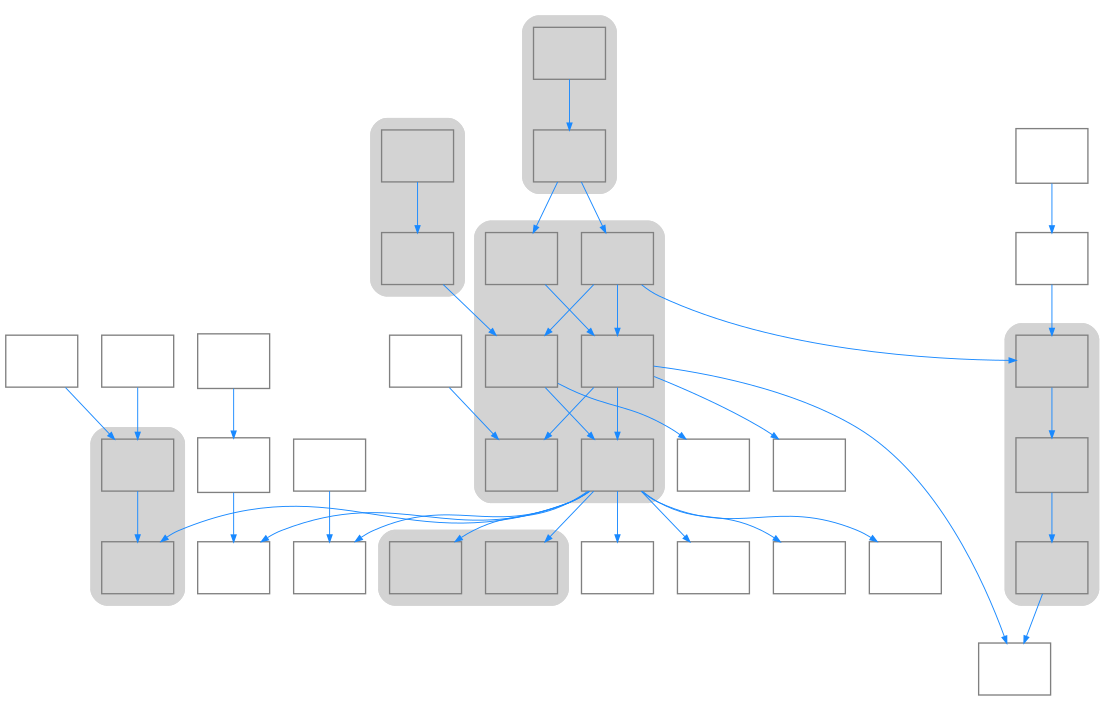
Last September, I wrote about the Thingiverse "Cube Gears" phenomenon, briefly tracing the origin of user emmett's Screwless Cube Gears through its evolution from Haruki Nakamura's papercraft geared heart sculpture via user GregFrost's printable Broken Heart thing. At the time, I really wanted to exhaust the graph of the cube gears / heart gears phenomenon, but didn't have the available free time. I've had some good publishing experiences using Graphviz to generate directed graphs, before, and kept dreaming about using it to show the family tree of Thingiverse physibles descended from Broken Heart. Well, I finally got around to doing it. These data were mostly gathered manually, but Thingiverse is already tracking derivation information for things, and it would not be a great coding challenge to automate the generation of these types of graphs using Graphviz, which is free software. The image above is static, but if you click on it, you should be directed to an interactive SVG version that allows you to navigate to the various things as you please. you should be fully clickable so you can navigate to the various things as you please. If you can't see SVG, for whatever reasons, there’s also a large (static) image here. The Graphviz source code is available here. These data were gathered on 2012-06-06 and are already obsolete, I should note. The graph has at least one new node since then. More:
Automatic image index maker software          
follower posted a new project up on Labradoc: an LED matrix display connected to an Arduino Mega ADK and an Android phone: 
I was working to get things working for the evening of Sat 19th (NZ time) but noticed an issue during the afternoon that stopped much in the way of new feature development. Once I had the the display working okay I added a couple of features: - One permanent message (hardcoded into the sketch) to display.
- Four “slots” used to store the last four SMS messages received. When a new message is received the oldest message is overwritten. (The display order doesn’t change however–i.e. the message in slot 1 is always displayed after the permanent message, even if it’s not the most recent/oldest.)
Project: SMS Text Scroller by follower          
On Tuesday, June 19, 2012, the author of the Arduino Cookbook is offering a free webcast, Expanding the Capabilities of your Arduino Projects: Michael Margolis is the author of Arduino Cookbook 2nd Edition, a collection of projects utilizing the physical computing platform of Arduino, the open source electronics prototyping platform. In this webcast Michael will discuss how to combine and apply multiple techniques from the Arduino Cookbook.
To get a taste of the Arduino Cookbook, have a look at this earlier post, Arduino Cookbook Excerpt: Large Tables of Data in Program Memory. For more information and registration: O’Reilly Webcast: Expanding the Capabilities of your Arduino Projects
In the Maker Shed:   Arduino Cookbook Arduino Cookbook Create your own robots, toys, remote controllers, alarms, detectors, and more with Arduino and this guide. Arduino lets artists and designers build a variety of amazing objects and prototypes that interact with the physical world. With this Cookbook, you can dive right in and experiment, thanks to more than a hundred tips and techniques, no matter what your skill level. Here you’ll find the examples and advice you need to begin, expand, and enhance your projects right away.          | 




No comments:
Post a Comment
Keep a civil tongue.