

Seven years of blogging - good coders code, great reuse |
| Posted: 11 Jul 2014 12:21 PM PDT
See the one year of blogging, two years of blogging, three years of blogging, four years of blogging, five years of blogging, and six years of blogging for the previous years' statistics. Let's start this year's stats with traffic:
This year: 784,992 uniques. 983,890 visits. 1,376,933 page views. I haven't been blogging much at all and that explains the negative delta. I've about 200 articles in drafts so stay tuned for some quality articles soon! Feedburner stats: At 16,500 rss subscribers this year. Last year 16,343. Delta 157. subscribe. Feedburner is a dead service now, so the rss subscriber count has become a meaningless, random number that changes daily. It fluctuates around 16,500 subscribers. Github stats: At 1700 followers this year. Last year 1400. Delta +300. follow me. Twitter stats: At 4130 followers this year. Last year 3774. Delta +356. follow me. Total articles written: 20. Top 10 articles:
My top 5 favorite articles:
That's all folks! Now let's have some 7 year birthday cake, And let's meet for the cake next year again! See you!       |
| splice() can be used to push(), pop(), shift() and unshift() and more Posted: 11 Jul 2014 11:29 AM PDT Someone asked me today about Perl array operations and it turned out he didn't know that all basic array operations, such as spliceSplice has the following prototype: splice(array, [offset, [length, [list]]]) Splice replaces push via spliceTo push to an array via splice, you need to set Let's say you've array my @a = ("foo", "bar", "baz", "rms", "lbt", "esr"); Then you can push to it via splice like this: splice(@a, @a, 0, "val1", "val2", "val3") The ("foo", "bar", "baz", "rms", "lbt", "esr", "val1", "val2", "val3") pop via spliceTo pop an element from an array via splice, you need to set Let's say you've array my @a = ("foo", "bar", "baz", "rms", "lbt", "esr"); Then you can pop it via splice like this: splice(@a, -1) The ("foo", "bar", "baz", "rms", "lbt") Here splice replaced the last element of the array with nothing, effectively removing it. shift via spliceTo shift a value off an array via splice, you need to set Let's say you've array my @a = ("foo", "bar", "baz", "rms", "lbt", "esr"); Then you can shift a value like this: splice(@a, 0, 1) The ("bar", "baz", "rms", "lbt", "esr") Similarly you can shift more than one value, if you increase splice(@a, 0, 5) This shifts first 5 values off the original array and it now contains: ("esr") unshift via spliceTo unshift values to an array via splice, you need to set Let's say you've array my @a = ("foo", "bar", "baz", "rms", "lbt", "esr"); Then you can unshift a new list to this array like this: splice(@a, 0, 0, "val1", "val2") The ("val1", "val2", "bar", "baz", "rms", "lbt", "esr") replace i-th element in an array via spliceTo replace i-th element in an array via splice, you need to set Let's say you've array my @a = ("foo", "bar", "baz", "rms", "lbt", "esr"); Then you can replace the 2nd element ("bar") via splice like this: splice(@a, 1, 1, "ror") The ("foo", "ror", "baz", "rms", "lbt", "esr") Similarly you can replace the i-th element with a list of values: splice(@a, 1, 2, "ror", "zoz") The ("foo", "ror", "zoz", "baz", "rms", "lbt", "esr") There are more operations that you can do with splice, such as deleting all elements in the array, adding elements at the i-th position. I'll leave these other operations as an exercise to the reader. I think you can do the same in other languages as well, such as JavaScript, as it also has    |
 Hey everyone! Another year has passed and it's been 7 years since I've been blogging here at catonmat.net! In this post I want to summarize this year's statistics.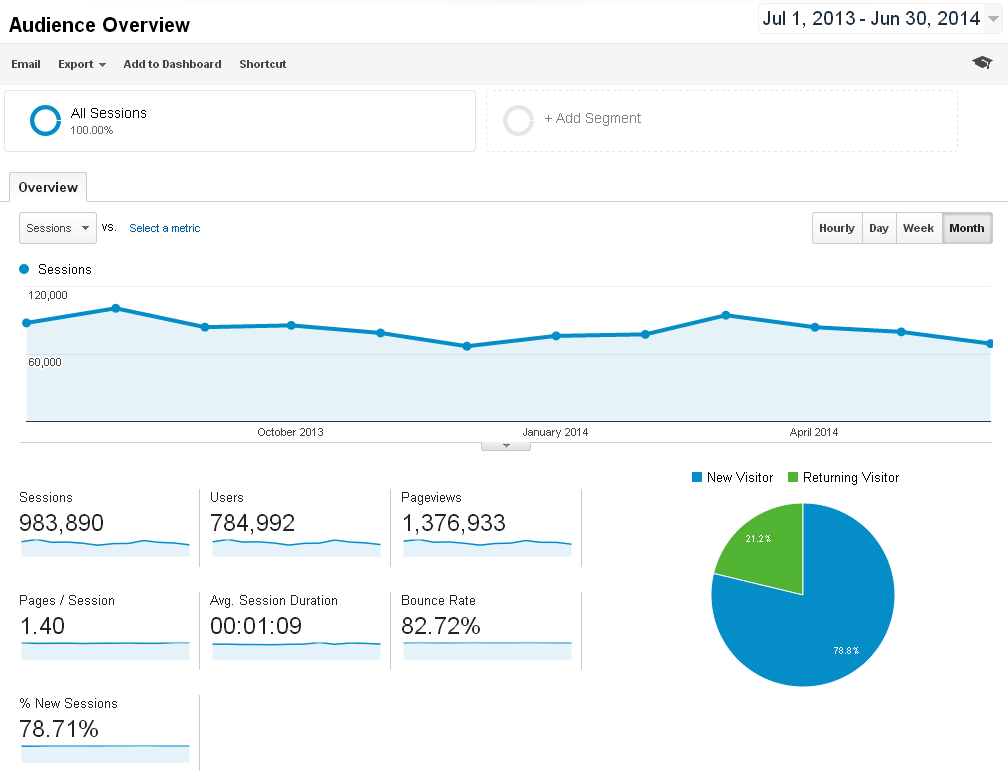

| You are subscribed to email updates from good coders code, great reuse To stop receiving these emails, you may unsubscribe now. | Email delivery powered by Google |
| Google Inc., 20 West Kinzie, Chicago IL USA 60610 | |


No comments:
Post a Comment
Keep a civil tongue.